What do you need before you start?
Very little. You need an iPhone with Safari (or Chrome), an internet connection and the username of a public Snapchat profile. You do not need a Snapchat account, you do not log in anywhere, and there is no app or Shortcut to install. Everything happens in a normal browser tab.
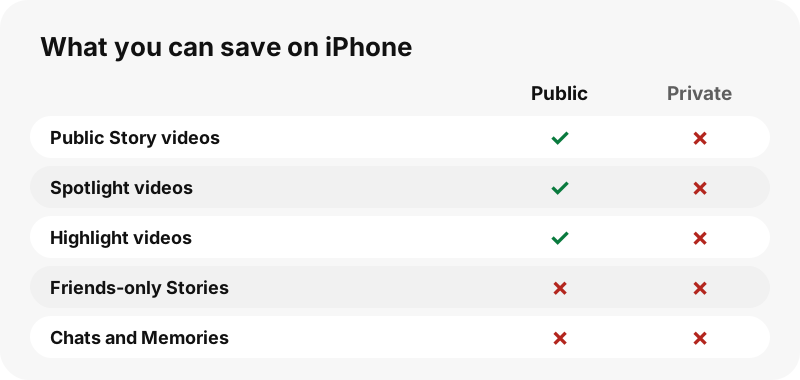
The one real requirement is that the video is public. SnapViewer reads the same public profile page that snapchat.com shows to anyone, so it can list a public Story, saved Highlights and Spotlight videos. Videos sent in chats, friends-only Stories, Memories and anything on a private account are out of reach, for us and for every honest website.
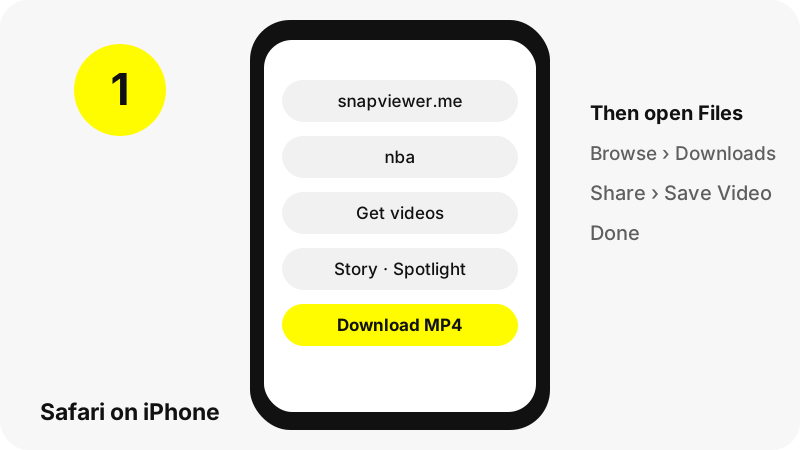
How do you download a Snapchat video on iPhone, step by step?
- Open Safari and go to the Snapchat video downloader (the box at the top of this page works too).
- Type the username, for example
nba, or paste a snapchat.com/@name link or a Spotlight link. The Paste button reads your clipboard if Safari allows it. - Tap Get videos. In about a second the profile card appears with Story, Spotlight and Highlights tabs. On this page, videos are listed before photos in the Story tab.
- Tap a thumbnail to play it in the page and check it is the right one.
- Tap Download under the video (the button is labelled MP4). If Safari asks whether to download the file, confirm.
- Open the Files app, tap Browse, then Downloads, to find the MP4.
The file name tells you what it is, such as nba_story_20261030-142210_3.mp4 for a Story snap or username_spotlight_1234567890.mp4 for a Spotlight video. That makes it easy to spot in a crowded Downloads folder.
Where does the video go on your iPhone?
Into the Downloads folder of the Files app, not straight into Photos. That is how iOS treats every file a website sends as a download, and Apple says so plainly.
“If you download a file onto your iPhone or iPad from the internet, you can find it in your Downloads folder in the Files app.”
If you do not see a Downloads folder on the Browse screen, Apple's tip is to tap iCloud Drive first. For a file you just saved, Safari also has a shortcut: tap the Downloads button next to the search field and the list opens with your newest files on top.
Our longer guide on where Snapchat downloads go covers every device side by side, including iPad, Android, Windows and Mac.
Can you choose iCloud Drive or On My iPhone?
Yes. In the Settings app, open Apps, then Safari, then Downloads. Apple lists three choices: iCloud Drive, On My iPhone, and Other. The choice decides which Downloads folder the MP4 goes to.
| Safari setting | Where the MP4 is saved | Good for |
|---|---|---|
| iCloud Drive | Downloads folder in iCloud Drive | Opening the same video later on your iPad or Mac |
| On My iPhone | Downloads folder on the phone itself | Saving iCloud storage, working offline |
| Other | A folder you pick | Keeping Snapchat videos in their own folder |
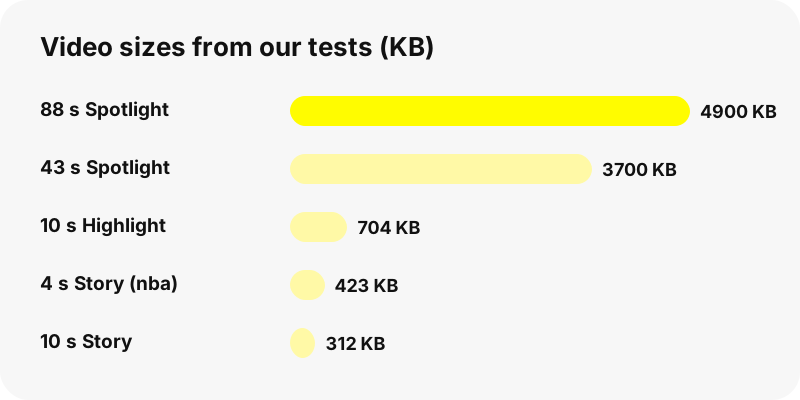
If your iCloud storage is nearly full, On My iPhone is the safer choice, because a full iCloud Drive can make large downloads fail. Spotlight videos are small anyway: the longest one in our tests, 88 seconds long, was 4.9 MB.
How do you move the video into the Photos app?
Open the MP4 in Files, tap the Share button and pick the option that saves the video to your library; on recent iOS versions it is labelled Save Video. The clip then shows up in Photos like any other video, ready for editing, sharing or a backup.
To find it again, Apple points to the Recently Saved collection under Collections in Photos, or you can sort the Library by Recently Added. Once the copy is in Photos, you can delete the one in Files to free space; the two are separate files.
Files are saved exactly as Snapchat serves them. We do not convert, compress, re-encode or watermark anything, so the copy in Photos is the same MP4 Snapchat streams.
Does it work in Chrome for iPhone too?
Yes. Chrome on iPhone handles downloads in its own way. Google's help page says that when you download, a Save in… screen lets you choose where the file goes, including your device or Google Drive.
One trap is worth knowing: Google notes that if you open a file in another app instead of saving it, Chrome keeps it in a temporary folder that is emptied when you close the Chrome window. Save the video to Files first, then open it. Safari has no such temporary folder, so we suggest it first.
Which Snapchat videos can you save?
Any video that a public profile currently shows. The three tabs map to three kinds of content, and each has its own page if you want more detail.
| Tab | What it holds | Size seen in our tests |
|---|---|---|
| Story | Public Story snaps, oldest first, with dates | 480×270 or 480×852 MP4, a few hundred KB |
| Spotlight | Recent Spotlight videos with views and length | 540×960 MP4, 0.8–4.9 MB |
| Highlights | Saved Highlights, up to 40 snaps each | 480×852 to 720×1280 MP4 |
For Stories, the Snapchat story downloader keeps photos and videos in their posted order. For Spotlight links copied from the app, use the Spotlight downloader, and for saved collections the Highlights viewer.
Can you save every video from a profile at once?
Each tab has a Save all N, one by one button. It starts the downloads in sequence with a short pause between files, so you do not have to tap every button yourself. There is no ZIP file: each video arrives as its own MP4 with its own readable name.
On iPhone, Safari may ask once whether the site can download several files. Allow it, then leave the tab open until the button says Done. If you lock the phone halfway, some files may not start; just press the button again or tap the missing ones by hand.
Why does the download fail or show an error?
Most failures come from one of four causes, and each has a quick fix.
- The link expired. Download links work for one hour. Look the username up again and the buttons get fresh links.
- The snap is gone. Stories leave Snapchat after a while. If Snapchat removed the video, we cannot fetch it either.
- The account is private or does not exist. The tool then says there is nothing public to show.
- Storage is full. Free some space, or switch Safari downloads from iCloud Drive to On My iPhone.
If a whole profile looks empty, our guide on why a Snapchat profile shows nothing walks through the usual reasons.
What quality will the iPhone video have?
The same quality Snapchat streams to the web, nothing more. In our tests Story videos were 480 pixels wide and Spotlight videos 540×960, with AAC sound. Anyone promising HD, 1080p or 4K Snapchat downloads is describing files Snapchat does not serve on public pages.
These sizes look sharp on a phone screen because Snapchat content is filmed and watched vertically. If you want the technical background on the container, MDN describes MP4 as a format that is broadly supported, which is why every iPhone app can play the file without a converter.
Is it OK to download someone's Snapchat video?
Saving a public video for your own viewing is a different thing from reposting it. Videos belong to the people who made them, so ask before sharing a clip elsewhere and never use one to harass, monitor or embarrass someone. Our guide on whether downloading Snapchat videos is legal explains the main rules.
Account owners who do not want their public profile shown here can opt out through the removal page. After that, the tool answers with a blocked message for that username, and links that were already handed out stop working.
Frequently asked questions
How do I download Snapchat videos on iPhone without an app?
Open SnapViewer in Safari, type a public username, tap Get videos, then tap Download under the video. The MP4 is saved to Files › Downloads.
Where do downloaded Snapchat videos go on iPhone?
To the Downloads folder in the Files app, either in iCloud Drive or On My iPhone depending on your Safari setting. They do not go straight to Photos.
How do I get the video into my camera roll?
Open it in Files, tap Share and choose the option that saves the video to Photos. It then appears in the Recently Saved collection.
Do I need a Snapchat account?
No. SnapViewer never logs in to Snapchat and needs no account of its own. You only type the username of a public profile.
Can I download videos from a private Snapchat account on iPhone?
No. Private accounts, friends-only Stories, chats and Memories are never visible to SnapViewer or any honest website.
Does it work in Chrome on iPhone?
Yes. Chrome shows a Save in… screen where you pick your device or Google Drive. Save to Files first rather than opening the file in another app.
Can I save all videos from a profile at once?
Use Save all N, one by one. Files download in sequence as separate MP4s; there is no ZIP. Safari may ask once to allow several downloads.
Why does the download say the link expired?
Download links last one hour. Look the username up again to get fresh links.
Will the video be in HD or 4K?
No. You get the file Snapchat serves, which in our tests was 480 to 720 pixels wide for Stories and Highlights and 540×960 for Spotlight.
Is there a watermark on the saved video?
We add none. The MP4 is passed through as Snapchat serves it, without re-encoding.
Does it work on iPad too?
Yes, the steps are the same in Safari on iPad, and the file lands in Files › Downloads there as well.
Is SnapViewer part of Snapchat?
No. SnapViewer is an independent tool and is not affiliated with Snap Inc. It only reads public profiles.
Guides
Video downloader — Every video on a public profile, as MP4 files with readable names.
Sources
- Where to find downloads on your iPhone or iPad — Apple
- Find your downloaded files on iPhone — Apple
- Customize your Safari settings on iPhone — Apple
- Find recently saved photos and videos on iPhone — Apple
- Download a file (Chrome on iPhone and iPad) — Google
- Media container formats: MPEG-4 — MDN
- Privacy by Product: Stories — Snap Inc.