What is Snapchat Spotlight?
Spotlight is Snapchat's feed of short public videos, a place to discover clips from people you do not follow. Snapchatters submit a video Snap, and Snapchat decides who sees it. Snap's help centre describes it this way:
“It shines a light on the most entertaining Snaps, no matter who created them.”
Only video Snaps of five seconds or more can be posted, and the Post button appears for people aged 16 or over in regions where Spotlight posting is enabled. Our guide what is Snapchat Spotlight covers the feed itself in more depth.
What does this Spotlight downloader do?
It saves public Snapchat Spotlight videos as MP4 files. You can work from a single link or from a username. Either way, SnapViewer reads the public page on snapchat.com without signing in and shows each video with its view count, length, upload date and caption when there is one.
The file you download is the one Snapchat serves to every viewer, unchanged. We do not re-encode, add a mark or keep a copy. It streams from Snapchat's servers to you through a signed link that expires after an hour.
How do you download a Snapchat Spotlight video?
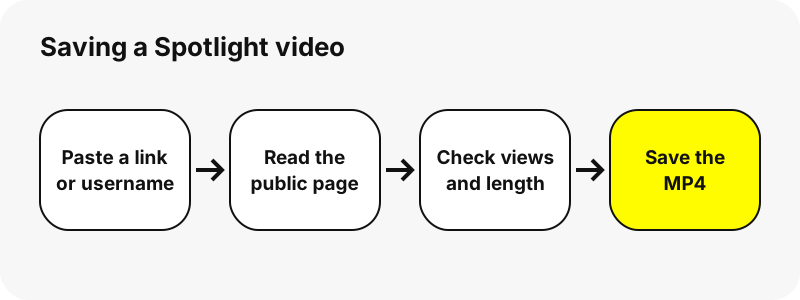
- In Snapchat, open the Spotlight video and use the share option to copy its link. On the web, copy the address from snapchat.com/spotlight.
- Paste the link above and press Get Spotlight.
- The video appears with the creator's name, views, length and date.
- Press play to check it, then press Download.
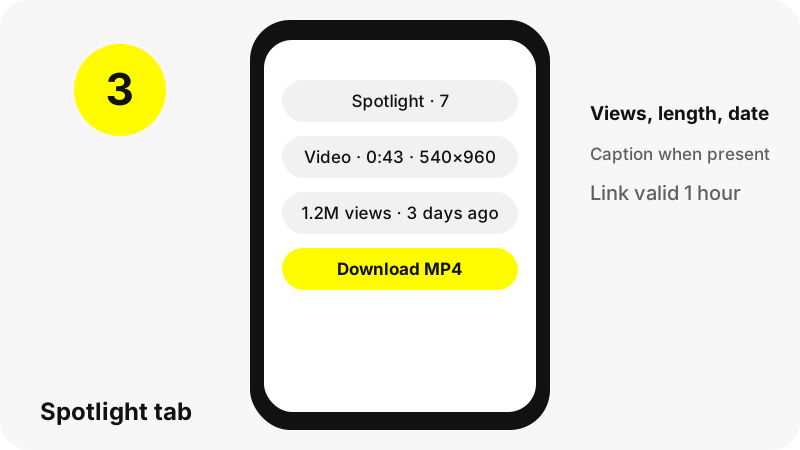
Do you know the creator but not the video? Type the username instead. The Spotlight tab then lists that profile's recent Spotlight posts, up to 60 videos, and you save the ones you want.
Link or username: which should you use?
| You paste | What you get | Best for |
|---|---|---|
| snapchat.com/spotlight/… link | That one video, with views, length, date and caption | A clip someone shared with you |
| Username or snapchat.com/@name | The profile card plus up to 60 Spotlight videos, and the Story and Highlights tabs | Browsing a creator's posts |
| Highlight link | The profile with that Highlight open | Saved Stories rather than Spotlight |
A link is precise: it lands on exactly one Snapchat Spotlight video, even when the creator has posted dozens. A username is broader and also opens the profile's Story and Highlights, which the Snapchat Story downloader and Highlights viewer focus on.
Which Spotlight videos are public?
Spotlight posts are public by nature. Snap's support page about saving and deleting Spotlight posts reminds creators of it:
“Keep in mind that Snaps submitted to Spotlight are Public Content, and your Snap may still appear off Snapchat if it has been shared off of Snapchat.”
There is one exception. Accounts under 16 use My Profile, and Snap says their Spotlight posts are visible to friends only. Those never reach the public web, so the tool cannot list them. Snapchat may also mark a single Spotlight as restricted; in that case we show a message instead of the video.
What quality are Spotlight downloads?
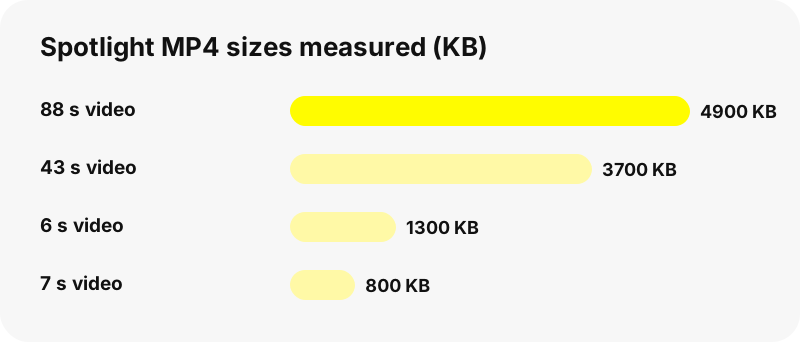
Every Snapchat Spotlight video we tested came out as a 540×960 MP4, a vertical phone-shaped frame. File sizes grow with length:
| Length | Size on screen | File size |
|---|---|---|
| 6 s | 540×960 | 1.3 MB |
| 7 s | 540×960 | 0.8 MB |
| 43 s | 540×960 | 3.7 MB |
| 88 s | 540×960 | 4.9 MB |
That is the quality Snapchat stores for streaming. There is no hidden HD or 4K version, and we never upscale the file to pretend otherwise. Compare all formats in Snapchat download formats.
What details does each Spotlight card show?
- Views: the count Snapchat publishes, shortened for big numbers (for example 1.2M).
- Length: minutes and seconds.
- Size: width × height in pixels.
- Upload date: shown as relative time or a date.
- Caption: the creator's description, when there is one. Snapchat's generic filler text is hidden.
These numbers come from the public page at the moment you search; view counts keep moving afterwards. We do not show comments, likes from specific people or who watched a video.
What is a downloaded Spotlight file called?
The pattern is username_spotlight_id.mp4: the creator's username, the word spotlight and the video's own Spotlight id. Two saves of the same clip therefore get the same name, which makes duplicates easy to spot.
To save several, use Save all above the list. Files download one by one with a pause between them, and your browser may ask once for permission. There is no ZIP, because building one would mean storing the videos, and we store nothing.
Where do Spotlight videos save on phone and computer?
In your browser's download location. On a computer that is normally the Downloads folder. On iPhone and iPad, Safari saves to Files › Downloads; open the video and use Share › Save Video to add it to Photos. On Android, Chrome saves to the Download folder, visible in the Files app.
Step-by-step help: Spotlight on iPhone, on Android and on PC, plus where Snapchat downloads go.
Why does the Spotlight tab look empty?
- The creator has not posted to Spotlight, or chose not to show Spotlight posts on the profile.
- The account is personal or under 16, so nothing is public.
- The link points to a Spotlight that was deleted or restricted.
- Snapchat was slow to answer. Wait a minute and retry.
- The download link is more than an hour old. Search again for fresh links.
Snap explains that creators aged 16 and over can choose whether a Spotlight shows on their Public Profile. More causes are in why a Snapchat profile shows nothing.
What can't a Spotlight downloader do?
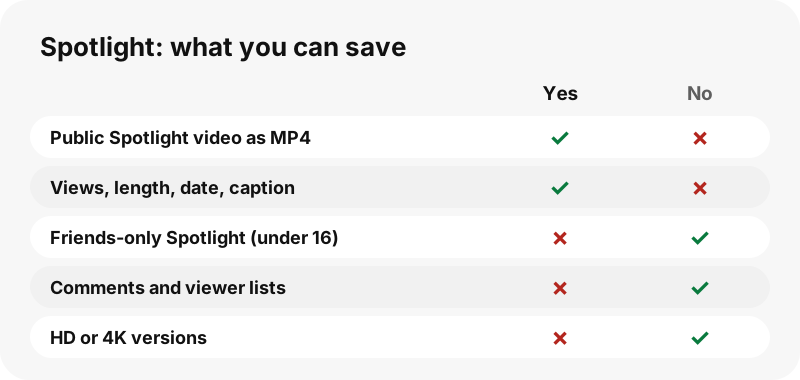
- No friends-only Spotlight posts from under-16 accounts.
- No HD, 4K or MP3 versions.
- No comments, reposts tab or list of viewers.
- No location or Snap Map data, ever.
- No app or extension: it is a web page that works in any browser.
Can you reuse a Snapchat Spotlight video you saved?
Saving for personal viewing is one thing; reposting is another. A Spotlight video belongs to its creator, even though it is public. Snap's privacy page notes that other Snapchatters may share Spotlight Snaps or remix them inside the app, but that is a Snapchat feature, not permission to reupload elsewhere.
Ask the creator before using a clip, and credit them. Creators can ask us to stop showing their profile or a single Spotlight through the copyright and opt-out page. See also is it legal to download Snapchat videos.
Which other tools work with Spotlight?
- Snapchat video downloader: all videos on a profile, Story videos first.
- Snapchat story viewer: watch the whole public profile.
- Snapchat username search: check a creator's username.
- Snapchat profile viewer: subscriber count, bio and category.
Frequently asked questions
Can I download Snapchat Spotlight videos for free?
Yes. No account, no payment and no app. Paste a link or a username and press Get Spotlight.
Do I need to log in to Snapchat?
No. SnapViewer never signs in. It reads the public Spotlight page that anyone can open in a browser.
Can I download a Snapchat Spotlight from a link?
Yes. Paste a snapchat.com/spotlight/ link and that single video appears with views, length and date, ready to save.
What format are Spotlight downloads?
MP4. Every Spotlight video in our tests measured 540×960 pixels, between 0.8 and 4.9 MB.
Can I save Spotlight videos in HD or 4K?
No. Snapchat serves 540×960 for Spotlight, and we save that file unchanged. Nobody can honestly offer a sharper copy.
Does the creator know I downloaded their Spotlight?
We never log in, so no Snapchat account is linked to your visit and we do not notify anyone. We cannot speak for Snapchat's own server logs.
How many Spotlight videos can I see per profile?
Up to 60 recent Spotlight posts per profile, each with its own Download button.
Can I download all Spotlight videos at once?
Yes, with Save all. Files save one by one; allow multiple downloads if your browser asks. There is no ZIP.
Why can't I see someone's Spotlight posts?
They may be under 16 (friends-only), may not show Spotlight on their profile, or may have deleted the posts.
Does it show Spotlight comments?
No. We show views, length, upload date and caption only. Comments are not part of what we read.
Is the view count live?
It is the number on the public page when you searched. It keeps changing on Snapchat afterwards.
Does the download include sound?
Yes, when the original has sound. The MP4 is Snapchat's file, so audio stays as the creator posted it.
Is SnapViewer part of Snapchat?
No. SnapViewer is an independent tool and is not affiliated with, endorsed by, or connected to Snap Inc. It only reads public content.
How do I remove my Spotlight videos from SnapViewer?
Use the copyright and opt-out page with your username or the Spotlight link. We then refuse that profile or video, and old links stop working.
Guides
Story viewer — Type a username to watch a public profile's Stories, Spotlight and Highlights.
Sources
- What is Spotlight? — Snapchat Support
- How do I post Snaps to Spotlight? — Snapchat Support
- How do I save or delete a Snap I posted to Spotlight? — Snapchat Support
- What makes Snaps eligible for Spotlight? — Snapchat Support
- What is My Profile and who can see it? — Snapchat Support
- Privacy by Product: Spotlight — Snap Inc.
- Media container formats (file types) — MDN Web Docs
- Where to find downloads on your iPhone or iPad — Apple