What do you need on a Windows PC?
A Windows computer with a current browser (Chrome, Edge or Firefox), an internet connection and the username of a public Snapchat profile. There is no program, extension or Snapchat login involved. The desktop is actually the most comfortable place to save many clips, thanks to the big screen and a real file manager.
Snapchat itself is built for phones, and its website mostly shows public profiles, Stories and Spotlight. SnapViewer reads that same public page and puts a download button under each video. Content behind privacy settings, such as friends-only Stories, private accounts, chats and Memories, never reaches us or any other honest tool.
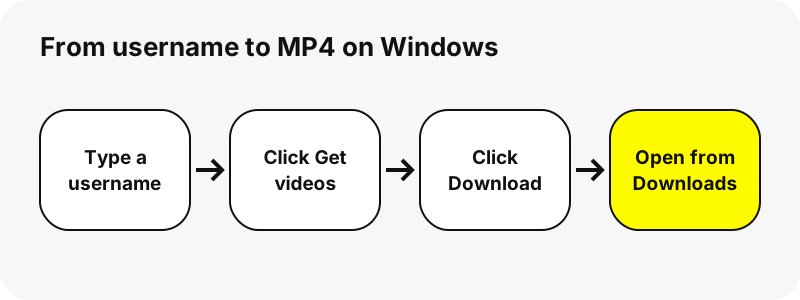
How do you download a Snapchat video on PC, step by step?
- Open the Snapchat video downloader in Chrome or Edge, or use the box at the top of this page.
- Type the username (for example
nba), or paste a link such as snapchat.com/@name or a Spotlight URL. Ctrl+V works as usual. - Click Get videos. The profile card appears with Story, Spotlight and Highlights tabs; in the Story tab, videos come first.
- Click a thumbnail to play the clip in the page.
- Click Download (labelled MP4) under the clip. The browser saves it to your download location.
- Open the file from the browser's download list, or find it in File Explorer under Downloads.
Files arrive with readable names such as nba_story_20261030-142210_3.mp4 or username_spotlight_1234567890.mp4. Sorting the Downloads folder by name groups all clips of one account together.
Where are the downloaded videos on Windows?
In the Downloads folder of your user account, unless you changed it. Microsoft gives the typical path as C:\Users\[your name]\Downloads and says you can check the exact location in your browser's settings.
| Browser | Where to see downloads | Change the folder |
|---|---|---|
| Chrome | Download tray at the top right, or More › Downloads | Settings › Downloads › Location |
| Edge | Downloads button in the toolbar, or Settings and more › Downloads | Settings › Downloads › Location › Change |
| Any browser | File Explorer › Downloads | Depends on the browser |
If you keep many clips, a dedicated folder helps. Microsoft notes that Edge can also ask where to save each file before downloading, which lets you drop each video straight into the right place.
Which app plays the MP4 on Windows?
The built-in Photos app, among others. Microsoft lists MP4 among the video formats it supports, so no codec pack or converter is needed.
“It supports a wide range of file formats, including JPEG, PNG, GIF, BMP, TIFF for photos, and MP4, MOV, and AVI for videos.”
By default Photos shows your Pictures folder. Microsoft explains that you can add other folders, such as Downloads, from the folders tab; then your Snapchat clips appear next to your other videos. Double-clicking the file in File Explorer opens it in your default player, whichever that is.
Which Snapchat videos can you save on a computer?
Any video a public profile shows at the moment, in three tabs.
| Tab | Content | Seen in our tests |
|---|---|---|
| Story | Public Story snaps with date, up to 150 | 480×270 or 480×852 MP4 with AAC sound |
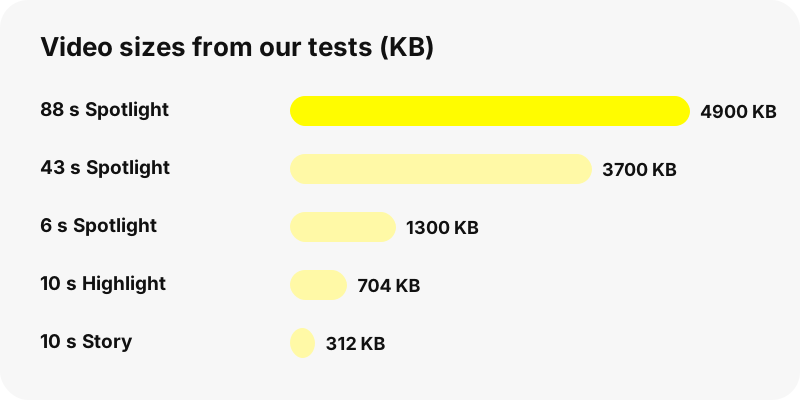
| Spotlight | Recent Spotlight videos with views and length | 540×960 MP4, 0.8–4.9 MB |
| Highlights | Up to 30 saved Highlights × 40 snaps | 480×852 to 720×1280 MP4 |
There are focused pages for each: the Snapchat story downloader, the Spotlight downloader and the Highlights viewer. The profile viewer shows the card on its own.
How do you save every video from one profile?
Click Save all N, one by one in a tab. The page starts each download in turn with a short pause between them. Chrome may ask whether the site may download multiple files; Google's help explains that you can allow sites to download related files together.
There is no ZIP: every clip is its own MP4. On a PC that is rarely a problem, because you can select all of them in File Explorer and move them to a folder in one drag. Leave the tab open until the button reads Done.
Why does the download not start or fail?
- The link is over an hour old. Links expire after one hour. Look up the username again.
- The snap was removed from Snapchat, so it is gone here too.
- The account is private or does not exist. You see a message instead of tabs.
- An extension blocked it. Some download managers or blockers catch file links; pause them and retry.
- The browser asked a question you missed. Check the download tray for a prompt to keep or allow files.
If a whole profile is empty, see why a Snapchat profile shows nothing.
What quality will the video have on PC?
The file Snapchat serves, unchanged. In our tests Story clips were 480 pixels wide, Highlights up to 720×1280 and Spotlight 540×960, all vertical. Played full screen on a large monitor they look softer than on a phone, simply because there are fewer pixels to stretch.
We never re-encode, so the clip does not lose quality on the way, and we add no watermark. Claims of 1080p or 4K Snapchat downloads do not match what public pages offer. MP4 is broadly supported, as MDN puts it, so any editor such as Clipchamp can import it.
Is it better than screen recording?
Usually yes. A screen recording captures your display, cursor and notifications, then compresses everything again. Downloading gives you the original MP4, with the original sound track and length, in a fraction of the time.
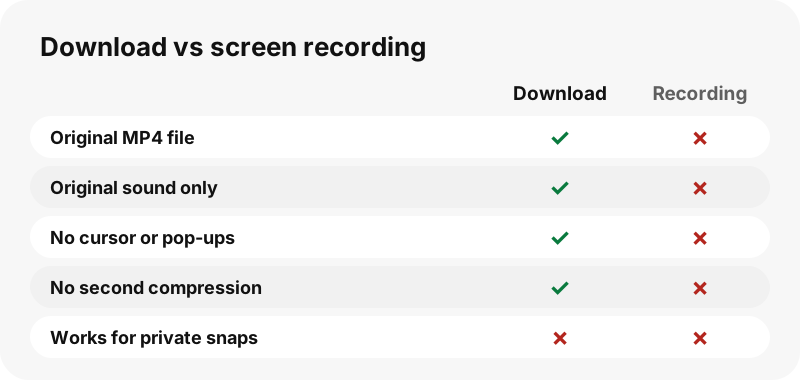
Screen recording still has one use: a snap that is no longer public. But if Snapchat no longer serves it, neither we nor any other web tool can fetch it.
Does the same method work on Mac or Chromebook?
Yes. The site is the same in every desktop browser; only the download folder and the player change. Read the guide for downloading Snapchat videos on Mac, or the shorter page for Chromebook. Our hub on where Snapchat downloads go compares all devices in one table.
Can you download anyone's Snapchat videos responsibly?
Keep downloads for your own viewing and ask the creator before reposting. Never use saved clips to monitor, track or embarrass a person. Our guide on whether downloading Snapchat videos is legal sums up the main rules.
Account owners can opt out on the removal page; their username is then blocked on SnapViewer and earlier links stop working.
Frequently asked questions
How do I download Snapchat videos on PC for free?
Open SnapViewer in Chrome or Edge, type a public username, click Get videos, then Download under the clip. It is free and needs no install.
Where do Snapchat downloads go on Windows?
To your Downloads folder, typically C:\Users\[your name]\Downloads, unless you changed the location in your browser settings.
What program plays the downloaded file?
The Windows Photos app supports MP4, and so do most video players and editors.
Do I need the Snapchat app or an account on my PC?
No. SnapViewer works in the browser, never logs in and needs no account.
Can I download private Snapchat videos on PC?
No. Private accounts, friends-only Stories, chats and Memories are never accessible.
Can I choose the folder for each video?
Yes. Turn on the option in Edge or Chrome that asks where to save each file before downloading.
Is there a bulk download or ZIP?
Save all N, one by one downloads every video of a tab in sequence, each as its own MP4. There is no ZIP.
Does it work in Firefox?
Yes. The Download button is a normal file link that every desktop browser can save.
Why did my download link stop working?
Links expire after one hour. Search the username again to get new ones.
Can I get the video in 1080p or 4K?
No. Snapchat's public pages serve smaller files: 480 to 720 pixels wide for Stories and Highlights and 540×960 for Spotlight in our tests.
Is there a watermark?
We add none and do not re-encode the MP4.
Is SnapViewer part of Snapchat?
No. SnapViewer is an independent tool and is not affiliated with Snap Inc. It only reads public profiles.
Guides
Video downloader — Every video on a public profile, as MP4 files with readable names.
Sources
- Download a file (Chrome on a computer) — Google
- Find where your browser is saving downloads — Microsoft
- Change the downloads folder location in Microsoft Edge — Microsoft
- Manage photos and videos with Microsoft Photos app — Microsoft
- Media container formats: MPEG-4 — MDN
- Privacy by Product: Stories — Snap Inc.