What is Snapchat Spotlight?
Spotlight is Snapchat's feed of short public videos, picked for each viewer by an algorithm rather than by who their friends are. It sits in its own tab at the bottom of the app, and anyone eligible can submit a video to it. Snap's help centre describes its purpose in one line:
“It shines a light on the most entertaining Snaps, no matter who created them.”
In practice it works like other short-video feeds: you swipe from one video to the next, tap to favourite or share, and the feed learns what you watch to the end. The difference from Stories is reach: a Spotlight post can be shown to people who have never heard of the creator.
When did Spotlight start?
Snapchat launched Spotlight in November 2020. Wikipedia's article on Snapchat records that the launch came with a promotion paying a total of $1 million a day to users who posted viral videos, and that the payout structure changed in 2021.
Snap's help centre still has articles on Spotlight payouts and Creator Rewards, and the rules change over time. We do not summarise amounts here; check Snap's current terms if you plan to post for money.
How is Spotlight different from Stories and Discover?
Stories show what your friends and the accounts you follow posted. Spotlight shows single videos from anyone, picked by the algorithm. Discover is a third section that Snap ranks with a similar personalised system, but the table below focuses on the two you will meet most.
| Stories | Spotlight | |
|---|---|---|
| Who you see | Friends and accounts you follow | Anyone, chosen by the algorithm |
| Format | Photos and videos, in sequence | Single videos, swiped one by one |
| How long it stays | 24 hours by default | Until the creator deletes it |
| Who can post | Everyone (to their friends) | Eligible users, 16+ for public reach |
| Public by default? | No, friends only | Yes, for public profiles |
The time difference matters most. A Story disappears after a day; a Spotlight video stays until its creator removes it. Our guide on how long Snapchat Stories last compares them in detail.
How does Spotlight choose what you see?
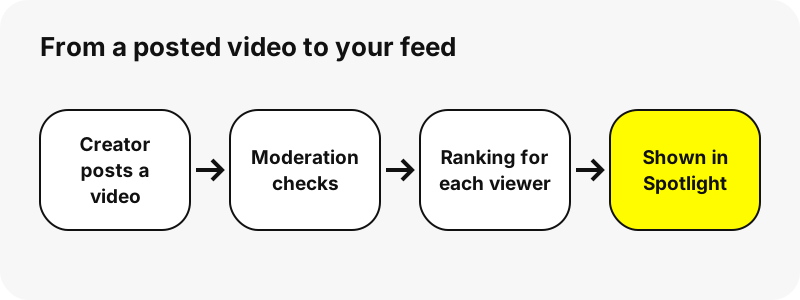
By ranking. Snap publishes a page on how it ranks Discover and Spotlight, and the main inputs are clear: your country, language and age group; the creators you subscribe to; what you favourite, share or comment on; and how long you watch each video and whether you finish it.
Negative signals count too. Skipping, hiding or reporting a video tells the system you do not want more like it. Snap also says it mixes in different kinds of content on purpose, to avoid an echo chamber.
Before any of this, content passes moderation: automatic checks plus human review against Snap's Community Guidelines and Content Guidelines for recommendation eligibility.
Who can post to Spotlight?
Users aged 16 or older in regions where Spotlight posting is enabled. The quickest route is to record a video of at least five seconds and tap Post on the preview screen; the button appears instead of the Stories button when the video qualifies.
You can also choose Spotlight on the Send To screen, add a description, a location tag or a #topic, then submit. By default the post is also shared to your Story, which you can switch off before submitting.
Under-16s can still post, but their Spotlight posts are visible to friends only, on the My Profile page. Only users with a public profile can have their display name attached to a Spotlight Snap.
Is Spotlight content public?
Yes, for posts from public profiles. Snap says Snaps and comments submitted to Spotlight are public, and that other Snapchatters may share them on and off Snapchat or remix them, for example by layering a reaction over a dance video.
“Your Spotlight submissions are stored on our servers until you delete them and may be visible on Snapchat for long periods of time.”
Creators can delete a post at any time from My Account, under Spotlight & Snap Map. Snap notes that a post already shared off Snapchat may still exist elsewhere, so the decision to post publicly is the one that counts.
What do views and favourites mean?
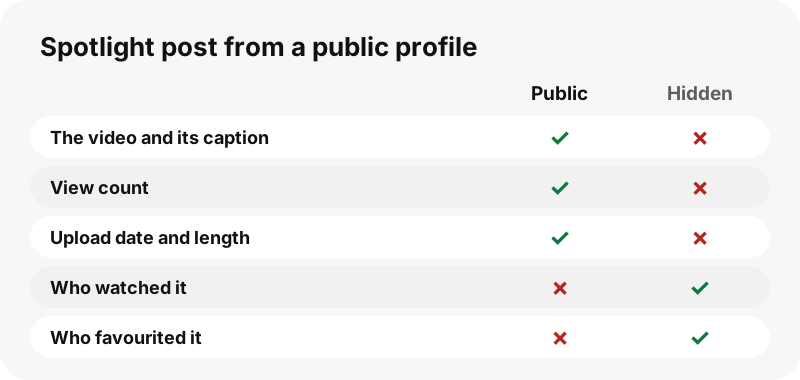
The view count on a Spotlight video is the number Snapchat publishes with the post, and it is the same number every visitor sees. A favourite is a viewer's signal that they liked the video; Snap adds it to that viewer's favourites list and uses it to personalise their feed.
SnapViewer shows the view count, the video length and the upload date exactly as Snapchat publishes them. We do not add or estimate anything, and we never show who watched or favourited a video.
Can you watch Spotlight without the app?
Yes. Snap itself points to a web version of the Spotlight feed at snapchat.com/spotlight, and a single Spotlight link opens in any browser. A public viewer is useful when you want one creator's Spotlight videos together, with their details, instead of a random feed.
In SnapViewer, type the creator's username and open the Spotlight tab, or paste a snapchat.com/spotlight/ link to see that one video alone. The Snapchat Spotlight downloader opens straight on that tab, and viewing Spotlight on iPhone covers phones.
What quality are Spotlight videos?
Snapchat serves Spotlight videos as compact MP4 files sized for phones. Every Spotlight video we saved on 2026-10-30 was 540×960 pixels and between 0.8 MB and 4.9 MB depending on length.
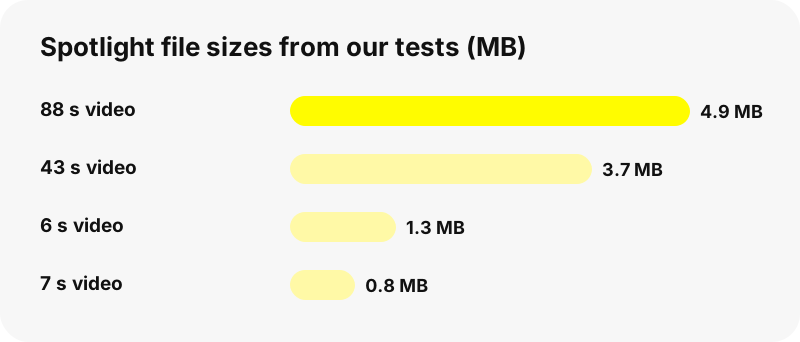
| Video length | File size | Resolution |
|---|---|---|
| 6 seconds | 1.3 MB | 540×960 |
| 7 seconds | 0.8 MB | 540×960 |
| 43 seconds | 3.7 MB | 540×960 |
| 88 seconds | 4.9 MB | 540×960 |
That is the file Snapchat delivers to every viewer. There is no hidden 1080p or 4K version, and a site that promises one is relabelling the same file.
Can you save a Spotlight video?
Creators can save their own posts from the Spotlight & Snap Map section of My Account. As a viewer, you can save a public Spotlight video with SnapViewer: each one has a Download button, and the file arrives as an MP4 named after the creator and the video.
The video still belongs to its creator. Keep saved copies for personal viewing, credit and ask before reposting, and read is it legal to download Snapchat videos before reusing anything. Snapchat may also mark a video as restricted, in which case SnapViewer does not show it.
Is Spotlight safe for teens?
Snap applies extra limits for younger users. Under-16s post to Spotlight for friends only, and 16 to 17 year olds have remix and profile-display options switched off by default. Ranking also uses age so that recommended content suits the viewer's age group.
Parents who want the full picture can read Snap's own safety and privacy pages, linked in the sources below. SnapViewer reads only public Spotlight posts and never shows comments, friends or locations.
SnapViewer is independent and is not affiliated with, endorsed by, or connected to Snap Inc. Creators can ask us to stop showing their profile through the opt-out page.
Frequently asked questions
What is Snapchat Spotlight in simple words?
A feed of short public videos from any Snapchat user, chosen for you by an algorithm. You swipe from one video to the next.
Is Spotlight the same as Stories?
No. Stories come from friends and accounts you follow and last 24 hours; Spotlight videos come from anyone and stay until the creator deletes them.
How old do you have to be to post on Spotlight?
16 or older for public reach. Under-16s can post, but only their friends see it.
How long does a video have to be for Spotlight?
At least five seconds when you use the Post button on the camera preview.
Does Snapchat pay for Spotlight videos?
Snap has run creator payments for Spotlight since its launch in 2020. Rules and amounts change; check Snap's help centre.
Can people see who posted a Spotlight video?
Yes, for public profiles. Only users with a public profile can have their display name attached to a Spotlight Snap.
Can I delete my Spotlight video?
Yes. Go to My Account, open Spotlight & Snap Map, press and hold the Snap and tap Delete Snap.
Can I watch Spotlight on a computer?
Yes. Snap offers Spotlight on the web, and SnapViewer shows a public creator's Spotlight videos in any browser.
Does a creator see that I watched their Spotlight?
SnapViewer never logs in, so no account of yours is attached. The public view count is Snapchat's own number.
What resolution are Spotlight downloads?
540×960 MP4 in all our tests on 2026-10-30, the same file Snapchat serves to everyone.
Is SnapViewer part of Snapchat?
No. SnapViewer is an independent tool and is not affiliated with Snap Inc. It only reads public profiles.
Why can't I open a certain Spotlight link?
Snapchat may have marked it as restricted, or the creator deleted it. SnapViewer says which case applies when it can tell.
Guides
Spotlight — Save public Spotlight videos as MP4, with views and length shown.
Sources
- What is Spotlight? — Snapchat Support
- How We Rank Content on Spotlight — Snapchat Support
- How do I post Snaps to Spotlight? — Snapchat Support
- What makes Snaps eligible for Spotlight? — Snapchat Support
- How do I save or delete a Snap I posted to Spotlight? — Snapchat Support
- Privacy by Product: Spotlight — Snap Inc.
- What is My Profile and who can see it? — Snapchat Support
- Snapchat — Wikipedia
- Spotlight Guidelines — Snapchat Support