How do you see who viewed your Story?
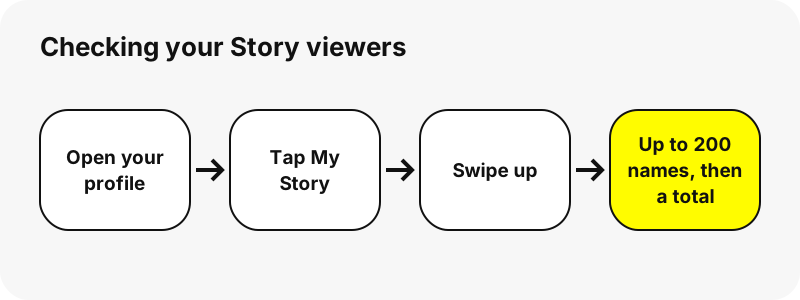
Inside the app, from the Story itself. Snap's steps are short: open your profile, tap My Story to play it, then swipe up. The viewer list slides up from the bottom of the screen, with names and a total count.
- Open Snapchat and tap your profile icon in the top-left corner.
- Tap My Story to start playing it.
- Swipe up on the screen.
- Read the list of names and the total number of views.
Check it while the Story is live. Most Stories delete after 24 hours unless you changed the setting or saved them to a public profile, and the viewer list goes with them.
Why do some viewers show only as a number?
Because Snapchat stops naming people after the first 200. Above that, you see the total keep rising, but no more names are added. Snap states the cap in its help article.
“You’ll see the names of up to 200 Snapchatters that viewed your Story. After 200 views, you’ll see a number, but no additional names.”
So a Story with 450 views shows 200 names and a total of 450. The 250 unnamed views are real Snapchat accounts; the app simply does not list them. There is no setting that lifts the cap.
Can you see who screenshotted your Story?
Yes. Snap says that, besides the view count and the names, the same swipe-up screen lets you see if a screenshot was taken of your Story.
Keep the limits in mind. Snap's article talks about screenshots only. It makes no promise about a photo of the screen taken with a second device, so do not post anything you would mind being copied.
How do you check viewers of a public Story?
Public Stories have their own screen. Snap says to tap your public Story Snap, then swipe up to open Insights and Replies. The friends, followers and other Snapchatters who watched are listed under Viewers.
Creators with a Public Profile also get Content Insights, which add totals such as views, unique viewers, screenshots and average view time for Spotlight posts. Those are numbers, not names of every person.
| Where you posted | Where to look | What you get |
|---|---|---|
| My Story · Friends | Profile → My Story → swipe up | Up to 200 names, then a total; screenshot markers |
| My Story · Public | Tap the public Story Snap → swipe up → Insights and Replies | Viewers list (friends, followers, others) and replies |
| Spotlight | Public Profile → Insights | Views, unique viewers, screenshots and other totals |
| Snapchat+ Story Rewatch | Tap the Story → swipe up | How many friends rewatched, not which ones |
Can you see who watched your Story more than once?
Only as a count, and only with Snapchat+. The Rewatch Indicator is an eyes emoji under Stories you post. Snap says the number next to it is how many friends rewatched, not how many replays there were in total.
Snap also says plainly that the indicator does not show which friends rewatched. You can switch it on or off from the Snapchat+ membership card under Story Rewatch Count.
A related Snapchat+ option, Story View Notifications, sends you an alert the first time a friend you pick views a Story you post. You choose the friends in the Snapchat+ settings.
| Viewer feature | Free account | Snapchat+ |
|---|---|---|
| Names of up to 200 viewers, then a total | Yes | Yes |
| Screenshot shown in the viewer screen | Yes | Yes |
| Rewatch Indicator (number of friends who rewatched) | No | Yes, can be toggled |
| Story View Notifications for chosen friends | No | Yes |
| My Story Timer (1 hour to 1 week) | No, 24 hours | Yes |
If your question is simply who viewed my Snapchat Story, the free list already answers it for the first 200 people. Snapchat+ adds counts and alerts, never a full list beyond that cap.
How long can you see your Story viewers?
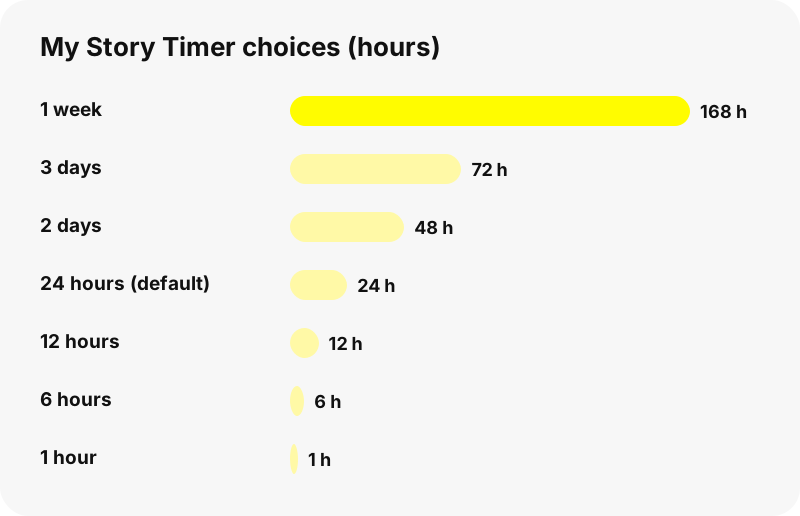
As long as the Story stays up. Snaps on My Story normally delete after 24 hours. Snapchat+ members can set a My Story Timer from one hour to one week instead, which changes how long a Snap, and its viewer list, stays visible.
Saving a Story to Memories keeps the Snaps; Snap's help pages describe the viewer list only on the live Story. Our guide on how long Snapchat Stories last covers saved and public Stories in more detail.
Does Snapchat show who viewed your profile?
Snap's help pages describe viewer lists for Stories and totals for Spotlight, not a list of people who opened your profile. If someone looks at your profile without opening a Story, there is no help article that says you will see their name.
Apps and sites that promise a list of profile visitors cannot get one from Snapchat. Treat them the way you would treat any request for your Snapchat password: close the page.
Do viewer websites appear in your viewer list?
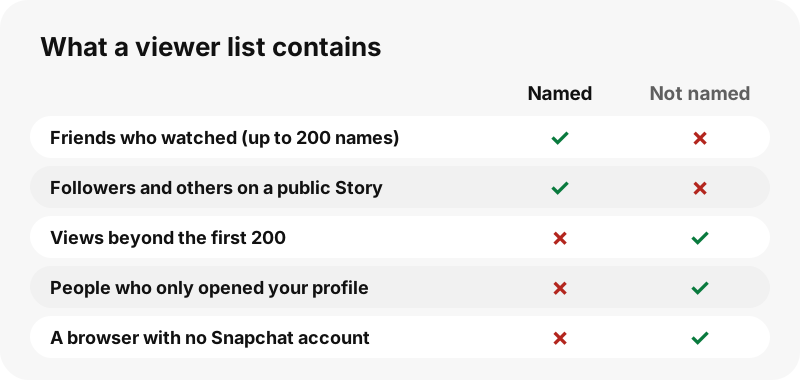
A Story list shows Snapchatters, meaning people logged in to a Snapchat account. SnapViewer never logs in to Snapchat, so we do not add any account's name to your viewer list. Our server opens the public profile page the same way a browser with no account would.
We also want to be precise. The previews and videos played on our page load from Snapchat's own media servers, which receive an ordinary web request. We cannot see or control what Snapchat counts on its side, so we never promise that a view is invisible to Snap.
Our guide on viewing Snapchat stories without an account explains what this means in practice.
Which of your Stories can outsiders watch?
Only public ones. By default, Snap says only your friends can view your Story. A Story becomes visible to anyone when you post to My Story · Public or when an older Everyone setting is still in place on your account.
Friends-only Stories, Private Stories, chats, Memories, location and friend lists never appear on a public profile page, so neither SnapViewer nor any honest website can show them. If you want to keep a Story out of view, post it to friends only.
Want to see what a stranger sees? Type your own username into our Snapchat profile viewer. If it shows nothing but a name and a Bitmoji, your account is personal, and nothing else is public.
How can you limit who sees your Story?
Change the Story privacy setting. Snap's steps: in My Account tap the gear icon to open Settings, open My Privacy & Data, scroll to Who Can See, tap View My Story, and choose My Friends or Custom.
- Snaps keep the setting they had when posted. Changing it later does not hide older Snaps.
- Post sensitive Snaps to friends only rather than to My Story · Public.
- Delete a Snap from your Story if you posted it to the wrong audience.
- Public profile owners can also ask SnapViewer not to show their profile through our opt-out page.
What does SnapViewer show for public profiles?
SnapViewer is an independent web tool for public Snapchat profiles. Type a username to see the profile card, the current public Story, saved Highlights and Spotlight videos, with a Download button for each snap.
It does not show viewer lists, screenshot markers, Snapscore, Streaks or Best Friends planets: those exist only inside the app for the account owner. Use the Snapchat story viewer for public Stories or the Highlights viewer for saved ones.
SnapViewer is not affiliated with, endorsed by, or connected to Snap Inc. Profile owners can ask us to stop showing their public profile; see the copyright and opt-out page.
Frequently asked questions
How do I see who viewed my Snapchat Story?
Open your profile, tap My Story to play it and swipe up. The names and the total view count appear at the bottom.
Why can't I see all the names?
Snapchat shows up to 200 names. After 200 views you see only the total number.
Can I see who screenshotted my Story?
Yes. Snap says the swipe-up viewer screen also shows whether a screenshot was taken.
Where are viewers of a public Story listed?
Tap your public Story Snap and swipe up to open Insights and Replies. Viewers are listed under Viewers.
Can I see who rewatched my Story?
Not by name. Snapchat+ shows how many friends rewatched, through the Rewatch Indicator, but not which friends.
How long is the viewer list available?
While the Story is live, usually 24 hours. Snapchat+ members can set a My Story Timer from one hour to one week.
Can I see who looked at my profile?
Snap's help pages describe viewer lists for Stories, not for profile visits. Sites that promise a list of profile visitors cannot get one from Snapchat.
Will I see SnapViewer in my viewer list?
SnapViewer never logs in to Snapchat, so we add no account name to your list. We cannot control what Snapchat counts on its own servers.
Can SnapViewer show who viewed someone's Story?
No. Viewer lists exist only in the app for the person who posted. We show public profile content, not who watched it.
How do I stop strangers seeing my Story?
Set View My Story to My Friends or Custom in Settings and post to My Story · Friends instead of My Story · Public.
Does the viewer list stay after I save the Story?
Saving keeps the Snaps in Memories. Snap describes the viewer list only on the live Story, so check it before the Story expires.
Is SnapViewer part of Snapchat?
No. SnapViewer is an independent tool and is not affiliated with Snap Inc. It only reads public profiles.
Guides
Story viewer — Type a username to watch a public profile's Stories, Spotlight and Highlights.
Sources
- How can I see who viewed My Story on Snapchat? — Snapchat Support
- How do I see who viewed and replied to my public Story? — Snapchat Support
- How does the Rewatch Indicator work on Stories I post to Snapchat? — Snapchat Support
- How do Story View Notifications work with Snapchat+? — Snapchat Support
- How do I view Content Insights for my Public Profile? — Snapchat Support
- How does the My Story Timer work on Snapchat? — Snapchat Support
- How can I change who can see My Story on Snapchat? — Snapchat Support
- Privacy by Product: Stories — Snap Inc.